
Extracting comps with AI can save real estate professionals hours of frustration. Comps come from a variety of sources, PDFs, spreadsheets, and scanned documents, and almost none of them follow the same format. This guide walks through how AI can streamline comp extraction, especially from Excel and CSV files, and turn them into one clean, structured format.
At CREx, we’ve developed internal tools to handle this, but the key lesson is this: AI works best when integrated with your existing workflow—not as a replacement. Let’s break it down.
Step 1: Understanding the Source Files
To start, we looked at two comp files:
- One directly sourced from New York’s property records.
- Another recreated using AI.
These files had completely different structures, column headers, naming conventions, and formats. That inconsistency is exactly where AI steps in to standardize everything.
Step 2: Why One-Shot AI Isn’t Enough
It might be tempting to just drop a file into a tool like ChatGPT or Claude and expect it to handle everything. But the reality is more complex. The real power lies in combining AI with a smart workflow that includes:
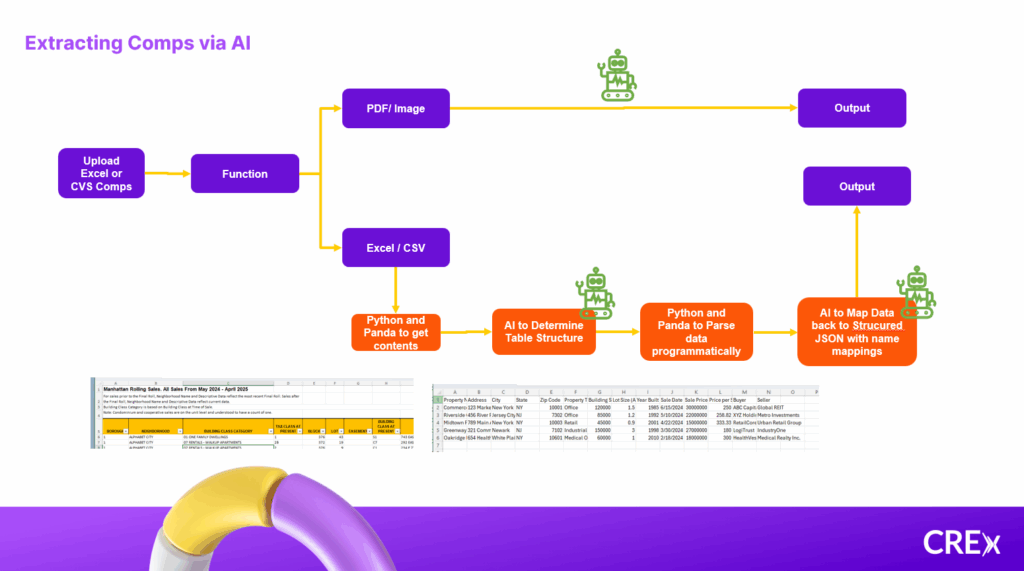
- Programmatic file reading using Python libraries like Pandas.
- AI parsing to interpret column headers and detect structural noise.
- Workflow orchestration to choose different models and logic paths based on file type (e.g., Excel vs. PDF).
Step 3: Breaking It Down, The Real Workflow
Here’s how we actually process the data:
- Read the file with Python/Pandas – Converts the raw Excel/CSV into a data frame.
- Use AI to identify headers and structure – AI scans the data to find actual column headers, even if they appear in different rows or formats.
- Send the structured header data back to the programmatic pipeline – This allows consistent reading of the content.
- Use AI again to normalize column names and values – Terms like “sold,” “purchase price,” or “SLD” get intelligently mapped to one standard field.
- Export to JSON with a rigid output schema – Ensuring that all comps, regardless of their source, look the same on the backend.
What You Get in the End
The final result is a clean, standardized comp data output. Even if some fields are missing, the AI fills in what it can and marks the rest as N/A, maintaining the structure across all files. Whether you’re working with multiple CSVs, Excel files, or even scanned images (covered in a separate video), the comps all flow into a unified format that’s easy to use.
Final Thoughts
Extracting comps with AI isn’t about replacing workflows; it’s about enhancing them. The combination of classic programming tools with AI’s pattern recognition makes it possible to process varied data formats in a way that’s scalable, accurate, and repeatable.
At CREx, we’re building tools that do exactly this: streamline data extraction, standardization, and analysis so you can focus on the insights that matter. Whether you’re managing 10 properties or 10,000, our platform helps you centralize and scale your real estate operations with less manual effort.
Check out our video on the topic here!
Ready to see how CREx can simplify your comp workflows?
Get a demo →